Header-Bar

Showing posts with label From The Papers. Show all posts

September 11, 2014

A List of 5 Million 'Gmail Passwords' Leaked, But There's No Need to Panic


זה זמן טוב לשנות סיסמאות! שוב! אבל אם השתמשת בסיסמא ייחודית עבור חשבון הגוגל שלך, את אולי יכול להיות רגוע יותר.
לפחות 5 מיליון קומבינציות של חשבון אי-מייל והסיסמא הייחודית שלו פורסמו ברשת ביום שלישי האחרון (9/9/14) אבל הסיסמאות, על פי דיווחים, נראו ישנות ולא מעודכנות. במקום, נראה שהרבה מהסיסמאות נלקחו מאתרים בהם משתמשים ככל הנראה נרשמו עם סיסמא דומה לחשבון ה-Gmail שלהם.
 לדוגמא, משהו כנראה נרשם לאתר כלשהו עם המשתמש address@gmail.com ועם הסיסמא "password". האתר נפרץ והרשימה הופצה, אך אין זה מעיד כלום על חשבון ה-Gmail, אלא אם כן השתמשתם בסיסמא "password" גם עבור אותו חשבון.
אין באפשרותנו לאשר דבר על העובדות הללו ולכן עליכם לבדוק בעצמכם, וכמובן להחליף את הסיסמא.
דובר גוגל אמר שלחברה אין כל ראיה שאכן נגנבו נתונים או שישנה דליפה של מידע. מומחי אבטחה אומרים שאכן מדובר באתרי צד שלישי שכנראה נפרצו ולכן הסיסמאות אינן תואמות את החשבונות של Gmail.
בכל אופן, שנו את הסיסמא ודאגו לבחור סיסמא חזקה המכילה לכל הפחות:
1) 10 תווים
2) מספרים
3) אותיות גדולות ו-קטנות באנגלית
4) סימן מיוחד (למשל: $ # & ^ @)
בדיקה האם האימייל נפרץ: 
https://www.hacked-db.com/
הורדת קובץ טקסט המכיל את רשימת הקומבינציות המלאה: (150Mb) 
http://f2h.nana10.co.il/o90lxy8rs34t
**שימו לב - ייתכן והלינקים הללו יסגרו בשלב כלשהו.
.

April 6, 2013

Attack on Israel : How to stay protected

Hello everyone,

As we all know, April 7th 2013 was marked as a day of digital terrorism in the cyber space. The day was marked by the famous Hacktivists group Anonymous and the target was the Israeli cyber space including: banks, government, social media, service providers, academy and more.

We as civilians of Israel are mostly worried about our personal information resides in our banks, social media servers and Mail service providers. Any information captured by those Hacktivists will probably be published and distributed immediately in the world wide web, never to be returned. Also a risk of malicious usage in this information should be taken into account.

In order to keep you on the safe side I would like to share the following list for you to follow.

I promise that if you follow those instructions, the chance for you being a victim in this attack will decrease eve to 0%.

List of Do's and Don'ts:
1. First of all, change your main passwords: Facebook, Mail, Paypal, banks, Ebay etc. But how?
- Your password should contain at least 10 characters.
- Your password should contain Upper case letters (A,B,C) with Lower case letters (a,b,c), numbers and special characters (#,$,&,@).
- Your password should not contain:
First name
Last name
Middle name
Date of birth
Family members or spouses.
Any other famous dates
Known passwords (12345, 1q2w3e etc.)

- Do not use the same password in 2 different sites.

- Keep track of your Credit Card transactions.

- Go to Google: search for your name and other private information and try to remove any information you find irrelevant such as account one online stores, registration you made to newsletters and more.

- Avoid opening E-mail you're not sure of their integrity.

- Avoid logging into accounts from computers other than your personal one.

- Avoid download new updates for the upcoming week.

- Avoid clicking on links in Facebook or any other sites that provide a "check" to see if you're protected.

If you have any other questions, don't hesitate and simply leave a comment.

May the force be with you,

Ido Naor

February 25, 2013

Not Fedex - Malware attack; Spamming with fake receipt


Written by Bob "Wiz" Feinberg - Wiz's Blog
I want to alert my readers to a spam run I saw over the last couple of days and also explain what the purpose of the scam really is. This is a new variation of a long-running scam spoofing both your Post Office and a major brand courier service, leading directly to a malware attack.
This particular variant may well become the template for ongoing spam campaigns, if the success rate is high enough. Right now, 'tis the season to receive gifts and the bait in this email scam may well trap a lot of eager folks who just may be waiting for a promised delivery of a present or online purchase.
It starts with a message claiming to be from either "Worldwide Express Mail," or "Shipping Service," or "Postal Service," with an incomprehensible "tracking" or ID number as the subject. Most have this body text, or something almost the same as this:
Your parcel has arrived at the post office at December 20.Our courier
was unable to deliver the parcel to you.
To receive a parcel, please, go to the nearest our office and show
this receipt.
DOWNLOAD POSTAL RECEIPT
Best Regards, The FedEx Team.
Here is where wisdom and suspicion are your best friends. The message text contains horrible grammar, and both a reference to a "POSTAL RECEIPT" and to "FedEx." I hope that most of you are aware that FedEx is a courier service and is NOT associated with the "Postal Service," nor do they issue "Postal Receipts." You Country's official Postal Service does that. Yet, almost every email courier scam I have seen over the last year confuses at least two, if not three services: the US Postal Service (USPS), FedEx (a private company) and UPS (United Parcel Service).
If you receive one of these failed delivery scams and you see any sign of confusion about who was supposedly delivering the package, usually accompanied by bad grammar and sentence structure, delete it immediately.
So, if this is a scam, what is the payload and what is its purpose?
In some of the courier scams you are presented with an attachment (attached file). In others you are given a clickable link. Both of these methods are used to deliver malicious executables to your computer. But, in these current scams there is a link that downloads what would usually be an attached "Zipfile," which contains a concealed executable with the same name as the Zip file. In the current scam, the carrier file is named: "PostalReceipt.zip" and the unzipped executable payload is named "PostalReceipt.exe."
These files are not hosted by the Post Office, Postal Service, FedEx, or UPS, but are hosted on infected computers. Their job is to present you with a pop-up download box, offering the options to Open/Run or Save the Zip file. The payload is disguised as a printable receipt that one needs to claim their undelivered package, so it is understandable that many unwary people might choose to open or run that file.
What is inside PostalReceipt.zip and PostalReceipt.exe?
The Win32/Kuluoz.B Backdoor Downloader Trojan.
Once activated, this malware silently proceeds to download other malware, such as bank account stealing Trojans, or fake anti-virus, like the current crop of rogues called "Microsoft Antivirus 2013." This malware begins to scan your computer and displays an alarming number of fake detections of bad software, then tries to scam you into paying about a hundred bucks to remove the alleged threats. Other payloads may be a type of malware that locks your PC until you pay a (Police, FBI, etc.) ransom, which they call a "Fine."
If you read this before you encounter one of these scams, you will save yourself the trouble or expense of disinfecting your computers. If you fall for one that delivers a banking Trojan, you may not have any money left in your bank account to pay anybody to disinfect the PC!
These threats morph every few days, or on a weekly basis, as does the file names in the attachments, or at the end of poisoned links. Don't assume that your anti-virus already knows about these new files. It may or may not. It really takes about a day before all of the major anti-malware companies identify these variants and push out definitions to block them. You are the first line of defense! Stay alert now and forever! The bad guys really are out to get us. Chance favors the prepared mind.
If you did click on a poisoned link, you need to disinfect your computer. Here are some options for you to employ:
Have a safe, virus-free and very Merry Christmas!

July 8, 2012

Five DDoS attack tools that you should know about


Introduction


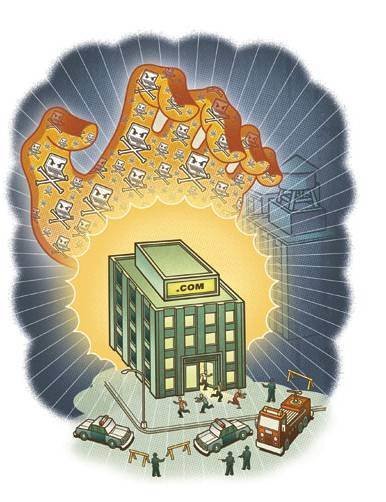
You could be a victim of a distributed denial-of-service (DDoS) attack at any time, hence it is important to be aware of common DDoS attack tools and their salient features. A single-point attack aimed at disrupting the services provided by an entity is termed as denial of service (DoS), whereas a multipoint attack with the same intentions is known as distributed denial of service (DDoS). In 2011, attackers exploited a vulnerability in Google servers to attack DDoS targets around the world by flooding them with requests. The most recent attack that affected millions of websites across the world was the DDoS attack on GoDaddy Inc. Statistically, there has been an exponential increase in the volume of DDoS attacks over the last three years. DDoS attacks are mainly targeted at an infrastructure level, with the average attack resulting in 20+ hours of service disruption! In this photo-story, we present to you the most common DDoS attack tools and briefly describe their capabilities and features.


1) Hulk Web server


The Hulk Web server is a brainchild of Barry Shteiman. This DDoS attack tool distinguishes itself from many of the other tools out in the wild. According to its creator, the Hulk Web server was born of his conclusion that most available DDoS attack tools produced predictable repeated patterns that could easily be mitigated. The principle behind the Hulk Web server is that a unique pattern is generated at each and every request, with the intention of increasing the load on the servers as well as evading any intrusion detection and prevention systems.


2) RUDY – R-U-Dead-Yet


RUDY – R-U-Dead-Yet is a DDoS attack tool specifically designed for HTTP DoS attacks. The principle behind RUDY – R-U-Dead-Yet tool is long-form field submissions. RUDY takes a URL as input and detects all forms within the URL.  Other features of RUDY include support for the SOCKet Secure (SOCKS) Internet protocol proxy, and session persistence using cookies. From a user perspective, R-U-Dead-Yet is a very user friendly tool, with a very interactive console menu.


3) LOIC - Low-Orbit Ion Cannon


The Low-Orbit Ion Cannon (LOIC) is a DDoS attack tool that promises one-click denial-of-service attacks.  LOIC has been made famous by the hacktivist group Anonymous. In principle, Low-Orbit Ion Cannon is a powerful tool capable of taking down millions of sites, but it has a major drawback in that it does not obfuscate the IP address of the attack launcher. LOIC had a very promising start but now it is considered to be just one more tool out there in the wild, due to its limitations. However, when combined with other functionalities, the Low-Orbit Ion Cannon could still prove to be a powerful component in the overall DDoS attack arsenal.


4) Power DDoSer


The online gaming arena witnesses furious competition in today’s scenario. Serious gamers might use any means, fair or foul, to outwit opponents.  Power DDoSer is one such attack tool online gamers use, with the objective of flooding an opponent with packets thereby slowing down the Internet connection and eventually knocking the opponent off the game! Power DDoSer offers added lethal functions as well. With Power DDoSer one can steal Firefox passwords, obtain the IP address and operating system details of the infected person, and download/execute files from/on the infected PC! Power DDoSer comes with powerful encryption technology and this DDoS attack tool needs as few as 10 bots to carry out an attack on single-threaded systems.


5) Silent DDoSer


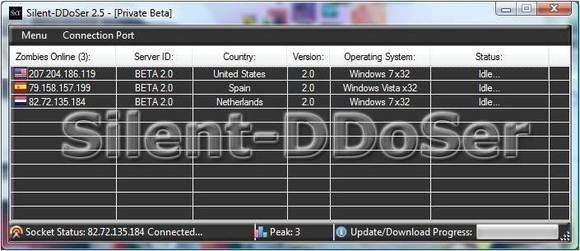
Silent DDoSer is a distributed denial-of-service tool that has been coded using the .Net platform, featuring UDP and SYN flooding that can disrupt any target. Silent DDoSer also has the ability to create bots, use zombie IP addresses and steal Windows keys. Apart from these, Silent DDoSer can be made to run at startup and has the ability to update the bots on the botnet at one go. Using the Silent DDoSER DDoS attack tool, PC to PC transfer of files is possible and the attacker has the ability to execute or download files to and from the infected host.


The other side of the coin


There are two sides to every coin. And this applies to the distributed denial-of-service attack story as well. So far in this photo-story, we have explored various DDoS attack tools that attackers might use on targets. Now what if you are at the receiving end? What are the ways to mitigate DDoS threats? Are your resources being used to DDoS other networks? Are you being made part of the botnet? Let’s address these issues in the following slides.


Bottlenecks and ghosts in the wire


You need to minimize bottlenecks in your networks. However strong your policies to secure your organization’s networks from DDoS attacks, a simple misconfiguration could cause lethal damage to your online identity. For instance, consider the case wherein a server is able to handle over 50,000 connections in parallel but has been configured to allow only 1,000 parallel connections. This is a classic example of a bottleneck within a corporate network.  Another instance is that of lack of visibility of the network. If the administrator cannot clearly see what’s happening inside the wires, then a ghost could enter the wire anytime and damage the entire network!


Threat landscape of DDoS attacks


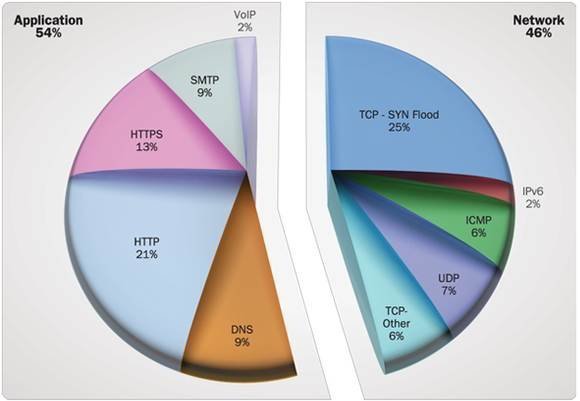
2011 saw a surge of DDoS attacks, surpassing all previous records. Surprisingly a majority of these distributed denial-of-service attacks were not attributed to bandwidth constraints. In the accompanying graph it is clearly seen that network-based DoS attacks were less than application-level DDoS attacks.  A majority of the attacks exploited the HTTP and its sibling HTTPS protocols. Attackers realize that volumetric attacks can be mitigated by use of scrubbers on the cloud, so they opt for slow and low DoS attacks, choosing applications as the target instead of networks.


To sum it up


We hope that this photo-story has given you an adequate overview of DDoS attack tools. Hopefully some of these pointers will help you mitigate DDoS attacks and prevent your own resources from being unwitting participants in a DDoS attack. 
The corporate threat landscape has changed from earlier years. Now it’s not so much a matter of declaring that you are “resilient” to DoS attacks, but being aware that it is just a matter of time before you would be threatened by a denial-of-service attack. So, make sure that you have carefully implemented optimum network configurations, with constant monitoring and updation of patches to the various systems. Organizations must admit that everyone is vulnerable, but in response to the current situation, the measures taken to address this threat landscape are what counts in the final analysis.